Frequently asked questionsIs it indispensable to register your product?It is not absolutely necessary, though very convenient. Embroidery Office does not require user registration for its normal functioning; but the registration is the procedure required by the manufacturers and distributors to validate the warranty, among other things. We have found out that many users prefer to start working immediately and leave this task for a later moment. This is why we have simplified the registration procedure so you can register your product in a few steps and quickly. What benefits do I get?
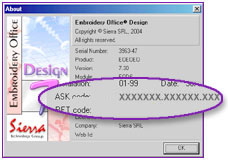
What is MyHome@EO?It is the name of the exclusive user club of Embroidery Office products created by Sierra. It is the place in which you will be able to keep in permanent contact with the working team responsible for the Embroidery Office product development. It is also the place to suggest, discuss, share, learn and receive definite solutions to problems related to your product. Embroidery Office product users from all the world share ideas, opinions and suggestions. ASK and RET/REG codes, do I really need them?A group of codes have been defined that allow to systematize the product registration process, speeding up the time between the request sent and the moment in which you can access the services enabled for registered users. This codes are not the same and do not replace the program activation password, used for the system installation. They must only be considered for the Embroidery Office® product registration manufactured by Sierra SRL. None of these codes hide confidential information of the user, his computer, his e-mail address, or other. You will only need to use this codes once, this is, when you register the product you have acquired. It is not necessary to memorize it, nor know them to operate your system, neither to enter the service area called MyHome@EO. When you are asked to write a code, verify the correct typing of the corresponding characters. Consider that an error in typing these codes may obstruct the registration process. If you wish, you can use the Windows® clipboard to “copy” the code and “paste” it in the form, avoiding frequent typing errors. ASK Code: What is it, what is it for, where can I find it?
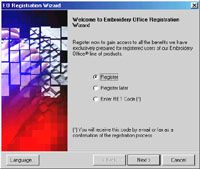
RET/REG Code: What is it, what is it for, where can I find it?It is a sequence of numbers, letters and punctuation marks that represent a confirmation of a successful product registration process. Though the program can function normally without obtaining the RET/REG code, the application may periodically ask you to insert this code, to complete the registration cycle, indicating that the product has been successfully registered. You will receive the RET/REG code by e-mail in answer to your registration request (in which you had sent the ASK code), to the e-mail address you specified in the registration wizard or form. Register the RET/REG code
Verify the RET code
User IdentificationWhen you receive the e-mail message confirming your product successful registration, along with your RET code, you will also receive your User Identification and Password to enter the service area called MyHome@EO. Afterwards you will be able to modify your password at will, though your original ID and Password might continue active. Keep the e-mail message for future consult. Registration Process Synthesis
|
 Versions v7.00 and more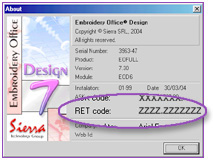

 Your name and your company contact information
 Your registration confirmation (RET code or REG)